Before You Buy That Headset: What Your Gaming PC Is Actually Hiding From You
So you've been eyeing a high-end PC VR headset. Maybe it's the Valve Index, maybe it's the Pimax Crystal, or one of the newer contenders pushing the resolution envelope. You've saved up, you've done some research, and you're feeling pretty good about pulling the trigger.
Then someone mentions your GPU.
Here's the uncomfortable truth that doesn't show up on any headset product page: the headset is often the least expensive part of getting a truly great PC VR experience in 2024. If your gaming PC hasn't been touched in three or four years, you could be walking into a money pit that makes the headset price look like pocket change. Let's break it all down — honestly and without the marketing fluff.
The GPU: Your Single Most Important Decision
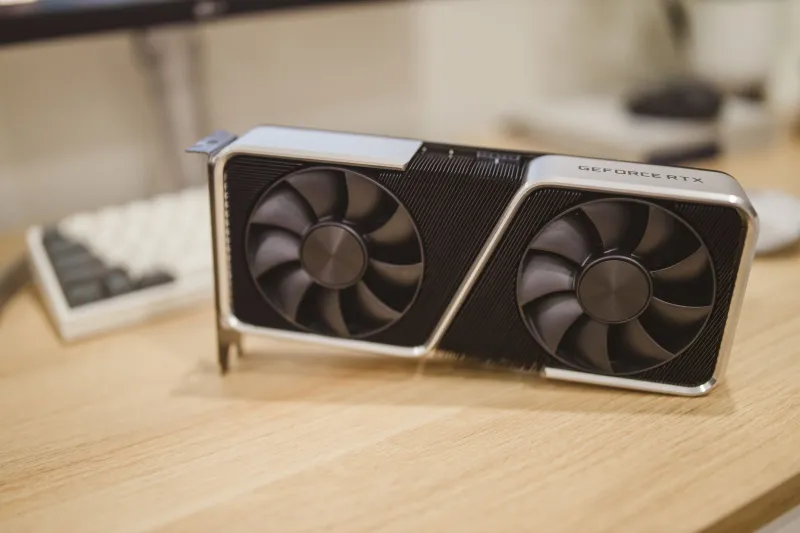
If there's one component that makes or breaks PC VR, it's your graphics card. Modern VR isn't just rendering one frame — it's rendering two, one per eye, at high resolutions and refresh rates, with minimal latency. That's a brutal workload.
For entry-level PC VR (think Meta Quest 3 connected via Link cable, running at modest settings), you can get by with something like an RTX 3070 or an AMD RX 6800 XT. But if you're chasing next-gen titles — the ones pushing foveated rendering, dense physics simulations, and 90-plus Hz at 4K-per-eye resolutions — you're realistically looking at an RTX 4080 or better. That's anywhere from $800 to $1,200 on its own, assuming you find one at MSRP.
If you're sitting on a 2070 Super or a 6700 XT right now, those cards aren't bad — but they'll bottleneck you hard the moment you step into something like Asgard's Wrath II maxed out, or any of the newer sim titles that have started treating VR as a first-class platform. Expect compromised resolution, dropped frames, and that uncomfortable judder that ruins immersion faster than anything else.
CPU Bottlenecks: The Silent Killer
GPU gets all the attention, but your CPU is quietly capable of wrecking your VR experience just as thoroughly. Physics calculations, AI behavior, audio spatialization, and game logic all live on the CPU side — and in VR, latency is the enemy. A slow or aging processor can cause stutters that no GPU upgrade will fix.
The good news: you don't need the absolute bleeding edge. A Ryzen 5 5600X or an Intel Core i5-12600K can handle most VR workloads without complaint. The bad news: if you're still running an older-generation quad-core chip — say, an i7-7700K that served you well for years of flat gaming — you're going to feel it. Upgrading to a modern mid-range CPU, factoring in a new motherboard and potentially new RAM (DDR5, anyone?), can easily run $400 to $600 before you've touched anything else.
RAM, Storage, and the Stuff Nobody Talks About
VR games are big. Not just in scope — in actual file size and streaming demands. You'll want 16GB of RAM as a baseline, with 32GB becoming increasingly recommended for the more ambitious titles. If you're on 8GB, add that to the list.
Fast storage matters more in VR than in traditional gaming, too. Load times that feel annoying on a flat screen become genuinely disorienting in a headset. An NVMe SSD is basically non-negotiable at this point. If you're still booting off a SATA drive, that's another $80 to $150 depending on capacity.
The Peripheral Tax
Here's where things get sneaky. Beyond the headset itself, PC VR often comes with peripheral costs that nobody budgets for upfront.
Base stations: If you're going with a SteamVR headset like the Index or the Bigscreen Beyond, you'll need base stations for room-scale tracking. A pair of Valve's current base stations runs about $150 to $200. They work great — but that's another line item.
Cable management: Tethered headsets come with cables, and cables are annoying. A quality ceiling pulley system or a wireless adapter (where available) can add another $50 to $300 to your setup.
Play space: This one's free, but it'll cost you differently — clearing out a 6x6 foot minimum area in your living room or spare bedroom is a real logistical challenge for a lot of households.
So What's the Real Number?
Let's put it together for a realistic scenario. Say you already have a solid mid-range PC with a decent CPU and 16GB of RAM, but you need a GPU upgrade and you're buying a mid-to-high-end PCVR headset:
- Headset (e.g., Bigscreen Beyond): ~$1,000
- Base stations: ~$175
- GPU upgrade (RTX 4080): ~$1,000
- NVMe storage upgrade: ~$100
You're looking at roughly $2,275 before you've bought a single game. That's not a criticism — it's just the reality of high-end PC VR.
The Standalone Alternative: More Honest Than You'd Think
This is where the conversation gets interesting. A Meta Quest 3 costs $500. A Meta Quest 3 with 512GB of storage costs $650. It runs standalone — no PC required — and for a huge portion of the VR library, including some genuinely impressive titles, it delivers an experience that most players find completely satisfying.
For someone starting from a mid-range PC that would need significant upgrades to run PCVR well, the math often tips toward standalone. You're trading some graphical ceiling for immediate playability, a wireless experience, and a library that keeps growing at a healthy pace. Games like Resident Evil 4 VR, Among Us VR, and Walkabout Mini Golf look and play great on standalone hardware.
The honest cost-benefit answer: if your PC already has a solid modern GPU, PCVR is worth it for the added fidelity and access to the full Steam VR library. If you're looking at a major PC overhaul, a standalone headset — or a standalone headset used as a PCVR device via Air Link or Virtual Desktop — is genuinely the smarter buy for most people right now.
Make the Call That's Right for Your Setup
There's no universally correct answer here, and anyone who tells you otherwise is probably trying to sell you something. High-end PC VR is a genuinely transformative experience when the hardware is there to support it. But standalone VR has closed the gap significantly, and the value proposition is hard to argue with.
Check your GPU first. Benchmark it against the recommended specs for the headset you're considering. Be honest about your CPU generation. Add up the real costs. Then decide.
Your future VR self will thank you for doing the math upfront — instead of discovering all of this one frustrating frame drop at a time.